Generative UI on iOS: the model composes, you set the grammar
Contents
- 01The reframe that makes it safe
- 02Where this comes from
- 03@Generable, in one paragraph
- 04The grammar
- 05The renderer
- 06Generation, and the part nobody warns you about
- 07Determinism is the default, and that is correct
- 08Two axes that look like one
- 09iOS 27: the model that composes is now swappable
- 10Where the wall is
- 11So, is generative UI real now
Every WWDC ships at least one feature that gets oversold in the first 48 hours and then underused for the next two years. Generative UI could be one of them. It could also be one of the rarer cases where the noise points at something real, as long as you understand what the model is doing, which is not writing your interface.
The short version: with the Foundation Models framework you can have an on-device model assemble a screen at runtime, choosing and ordering components from a vocabulary you define. The interface changes, sometimes radically, based on the user’s intent. The catch, and the whole point of this post, is the phrase “a vocabulary you define”. The model is creative only inside the grammar you hand it. That constraint is not a limitation to work around. It is the reason the thing is usable at all.
I built a small demo to test the idea and figure out where it breaks. Below is what I learned, with the parts of the code that matter.
The reframe that makes it safe
The instinct when you hear “AI generates the UI” is to picture a model emitting SwiftUI source that gets compiled and run. That is not what happens, and it is a good thing it is not. There is no runtime Swift compilation on iOS, and an interface that executes arbitrary model output would be a security hole wide enough to drive a truck through.
What the model produces instead is typed data. You describe a data structure that represents a screen, the model fills it in, and a renderer you wrote maps that structure to real views. The pattern is closer to server-driven UI than to code generation, except the server is a 3 billion parameter model sitting on the phone.
The piece that makes this practical is guided generation, and the macro behind it is @Generable.
Where this comes from
The web has been doing generative UI for a couple of years. Vercel’s AI SDK binds tool calls to React components. Google’s A2UI represents an interface as a flat list of components a model emits incrementally, which the client maps to native widgets, SwiftUI included. Flutter has a GenUI SDK. The shared idea is the one I am using here: the model orchestrates, picking from a pre-validated component library, and a renderer you own assembles the result.
What changes on the Apple stack is the engine. The model runs on-device, the output is type-checked by @Generable instead of validated JSON, and from iOS 27 the model behind it is swappable. That is the part worth a post, and it is where the rest of this goes.
@Generable, in one paragraph
Foundation Models shipped in iOS 26. The on-device model is good at language tasks: summarisation, extraction, classification, short generation. On its own it returns text, which means you would normally be back to parsing strings, the activity every developer claims to hate and does anyway.
@Generable removes that step. You annotate a Swift type with the macro, and the framework constrains the model so that its output is guaranteed to be a valid instance of that type. No JSON wrangling, no defensive parsing, no “the model added a markdown fence again”. You ask for a UIScreen, you get a UIScreen.
That guarantee is the foundation of everything else here.
The grammar
The vocabulary is just an enum. Every case is something the renderer knows how to draw. Adding a case widens what the model can invent. Removing one narrows the blast radius.
@Generable
enum UIComponent: Equatable {
    case heading(text: String)
    case paragraph(text: String)
    case keyValue(key: String, value: String)
    case badge(label: String, tone: Tone)
    case field(label: String, placeholder: String)
    case button(label: String, style: ActionStyle)
    case standings(title: String, rows: [StandingRow])
    case divider
}
Components are grouped into sections, sections into a screen. I use @Guide to nudge the model on each property, and I deliberately stop the hierarchy at two levels. Real recursion, containers inside containers inside containers, is something guided generation handles badly, so I do not ask for it.
@Generable
struct UISection: Equatable {
    @Guide(description: "Short section title, 1-3 words")
    var title: String

    @Guide(description: "1 to 6 components, in display order")
    var components: [UIComponent]
}

@Generable
struct UIScreen: Equatable {
    @Guide(description: "Screen title, shown at the top")
    var title: String

    @Guide(description: "1 to 4 sections grouping related components")
    var sections: [UISection]
}
That is the entire contract between the model and your app. The model gets to decide which components, how many, in what order, with what content. It does not get to invent a component you never defined.
The renderer
The renderer is the boring, deterministic half, and it should stay that way. It is a switch over the enum. Nothing intelligent happens here, which is exactly what you want: all the non-determinism lives in one place, the generation, and the rendering is a pure function of the data.
switch component {
case .heading(let text):
    Text(text).font(.largeTitle.bold())

case .badge(let label, let tone):
    Text(label)
        .font(.caption.weight(.bold))
        .padding(.horizontal, 10).padding(.vertical, 5)
        .background(tone.color.opacity(0.18), in: Capsule())
        .foregroundStyle(tone.color)

case .standings(let title, let rows):
    StandingsView(title: title, rows: rows)

// ...
}
Swap the model for a different model, swap the data source, the renderer does not change a line.
Generation, and the part nobody warns you about
You would expect to call the model directly. Do not wire it in naked. Put it behind a protocol.
protocol ScreenGenerating {
    func generate(from intent: String) async throws -> UIScreen
}
Two reasons. The first is the one the documentation buries: the on-device model does not run reliably in the Simulator. You will see availability report .available, then the generation dies at runtime inside SensitiveContentAnalysisML with a stack trace longer than the feature you are building. The Simulator is fine for build and layout checks. For the model you want a physical, Apple Intelligence capable device.
So I gate it at compile time and fall back to a deterministic mock everywhere else:
@MainActor
func makeScreenGenerator() -> ScreenGenerating {
    #if targetEnvironment(simulator)
    return MockScreenGenerator()
    #else
    switch SystemLanguageModel.default.availability {
    case .available:
        return ResilientScreenGenerator(
            primary: FoundationModelsScreenGenerator(),
            fallback: MockScreenGenerator()
        )
    default:
        return MockScreenGenerator()
    }
    #endif
}
The second reason is ResilientScreenGenerator. On a real device a generation can still fail: a timeout, a content-safety refusal, a model that is busy. When it does, I would rather degrade to a known screen than show the user an error domain. The fallback is not a special case buried in the view. It is another ScreenGenerating, composed.
struct ResilientScreenGenerator: ScreenGenerating {
    let primary: ScreenGenerating
    let fallback: ScreenGenerating

    func generate(from intent: String) async throws -> UIScreen {
        do { return try await primary.generate(from: intent) }
        catch { return try await fallback.generate(from: intent) }
    }
}
Same protocol, different behaviour, zero changes to the renderer. This is the part of the design I am happiest with, and it is not AI specific at all. It is just decoration.
One more practical note from the device: running the model floods the console with benign system logs from Biome, the internal data-stream subsystem. Things like “Failed to open lockfile … GenerativeModels.GenerativeFunctions.Instrumentation”. They look alarming and mean nothing. Filter them out and watch your own logs instead.
Determinism is the default, and that is correct
Here is the result that surprised me, and then on reflection did not. I generated the same screen from the same prompt several times and got the exact same structure every time. My first reaction was that something was cached. Nothing was.
The on-device model defaults to greedy sampling. Greedy means “always take the most likely token”, which means the same input produces the same output. For most serious Foundation Models work, extraction, classification, summarisation, that is precisely what you want: reproducible, testable, reviewable. Determinism is the sensible default, and variety is the special case you opt into.
For a generative UI you do usually want variety, so you ask for it through GenerationOptions. Temperature runs from 0 to 2. But temperature alone is not enough under greedy, you also switch to random sampling, and you have to vary the seed, because random sampling with a fixed seed is still deterministic for the same prompt.
let options = GenerationOptions(
    samplingMode: .random(top: 20, seed: UInt64.random(in: .min ... .max)),
    temperature: temperature
)
let response = try await session.respond(
    to: intent,
    generating: UIScreen.self
    options: options
)
The seed detail is the one people get wrong. They fix the seed for reproducibility, then complain the output never changes. Fix it on purpose when you want repeatable screenshots, leave it fresh when you want variety.
Two axes that look like one
This is the idea I most want you to leave with, because it is easy to conflate.
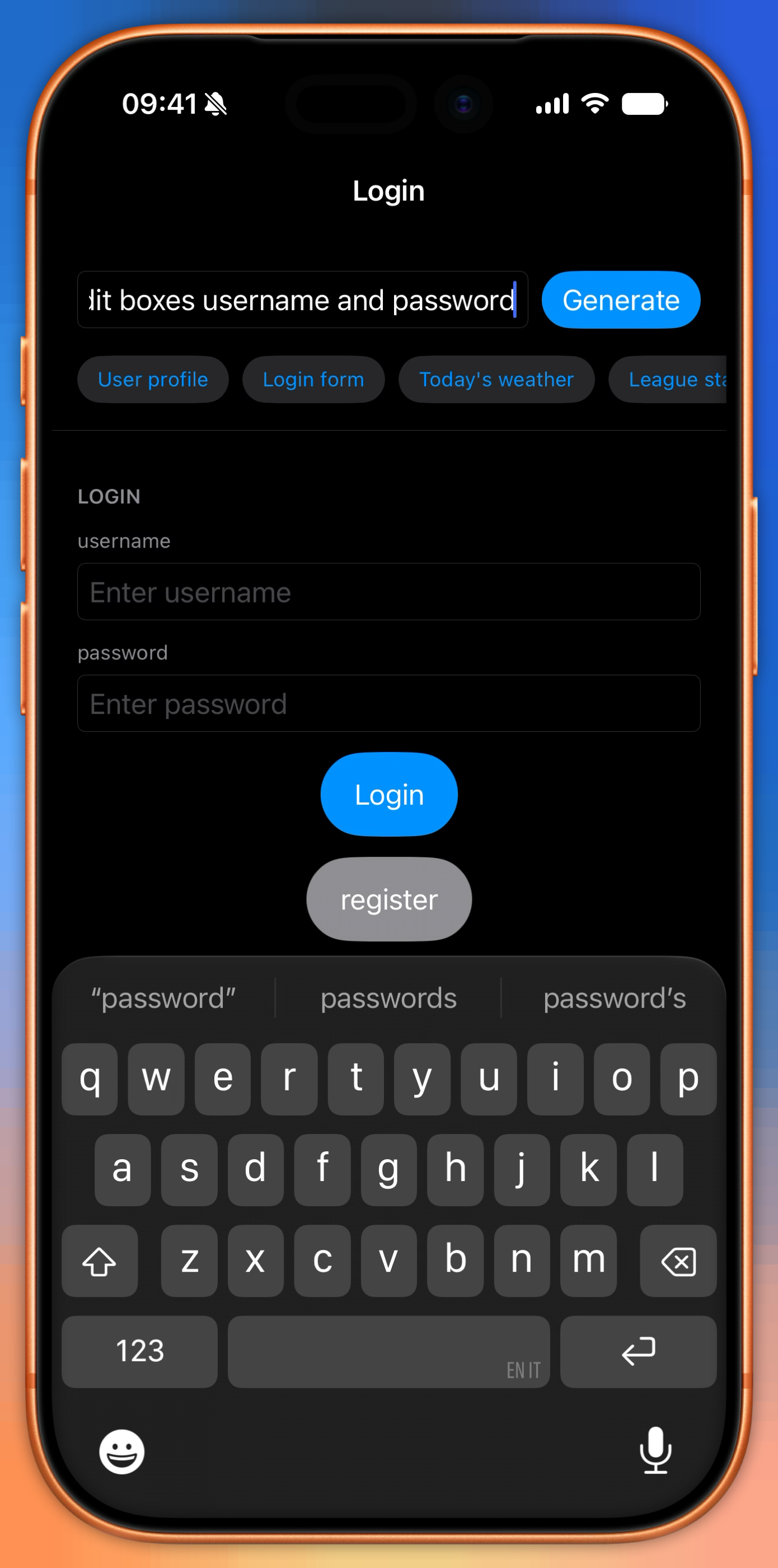
A richer vocabulary makes the model more expressive across different inputs. Add a standings component and a “league table” intent suddenly has somewhere to go. Before, it did not.
@Generable
struct StandingRow: Equatable {
    @Guide(description: "Team name")
    var team: String
    @Guide(description: "Points in the table")
    var points: Int
}
But a richer vocabulary does not make the model more variable on the same input. That variance comes from temperature and sampling. If anything, a specific component makes the structural choice more stable: ask for a league table and the model reliably reaches for standings. The team names and points dance around, the structure does not.
So the vocabulary controls what the model is capable of. The temperature controls how unpredictable it is. They are different dials, and they often pull in opposite directions. A wide vocabulary at temperature zero gives you a system that is expressive and deterministic at the same time, which for a production interface is frequently exactly the combination you want.
iOS 27: the model that composes is now swappable
Everything above works on iOS 26. What WWDC 2026 added is the piece that makes the pattern scale past the on-device model: a public LanguageModel protocol. Any provider, a cloud API, an open-source local model, a fine-tune you host yourself, implements it and ships a Swift package. Your LanguageModelSession code then works with it unchanged. Apple’s on-device model, Private Cloud Compute, Claude and Gemini all present themselves through the same session API. Anthropic published a conforming package the day of the announcement, Gemini plugs in through the Firebase Apple SDK, and for your own models there is Core AI, the new framework Foundation Models now sits on top of.
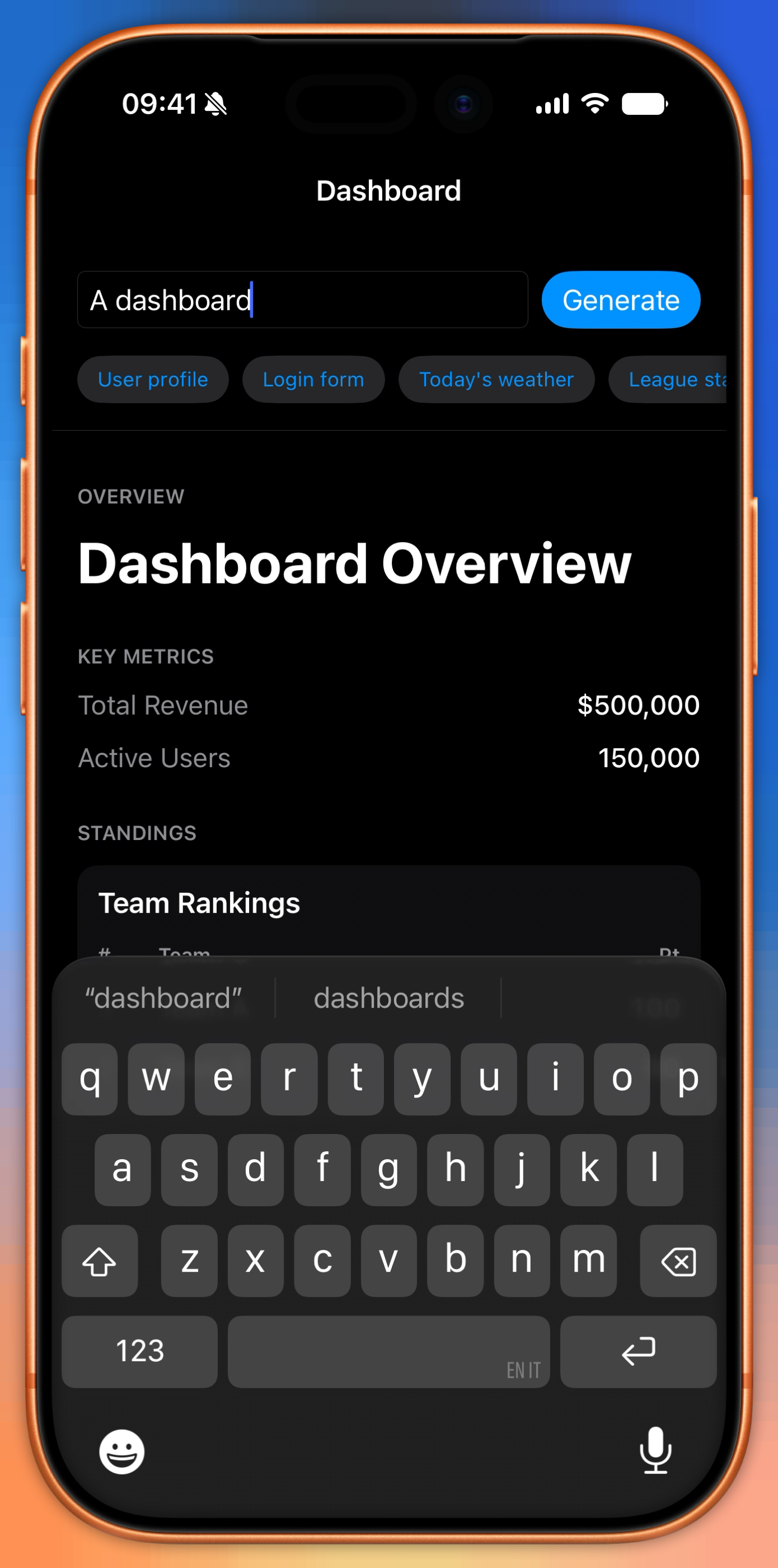
For a generative UI this is more useful than it sounds. The on-device model is enough to compose a login form or a weather card. A dense, deeply nested dashboard might want something with more reasoning headroom. With the protocol, the model is just a parameter. I made the generator take one, defaulting to on-device:
struct FoundationModelsScreenGenerator: ScreenGenerating {
    var model: any LanguageModel = SystemLanguageModel.default
    var temperature: Double = 0.9

    func generate(from intent: String) async throws -> UIScreen {
        let session = LanguageModelSession(model: model, instructions: instructions)
        // options, respond(generating: UIScreen.self) ... unchanged
    }
}
Swapping in Claude or Gemini is a dependency and one argument. The @Generable types do not change, the renderer does not change, the protocol seam I built does not change:
// import ClaudeForFoundationModels
FoundationModelsScreenGenerator(model: /* Claude model from the package */)

// import FirebaseAI
FoundationModelsScreenGenerator(
    model: FirebaseAI.firebaseAI().geminiLanguageModel(name: "gemini-3.5-flash")
)
One caveat to keep you honest: guided generation is part of the protocol surface, but a provider is allowed to not support it and throw unsupportedCapability(.guidedGeneration). Which is exactly the kind of failure the resilient fallback was built to swallow. The @Generable guarantee is rock solid on Apple’s own model. Across third parties, treat it as a capability you check, not a law of physics.
Notice the symmetry. Apple’s protocol swaps which model composes the UI. My ScreenGenerating protocol swaps the generation strategy, real, mock, or resilient. Two layers of the same idea, and they compose without knowing about each other. That is the whole job: keep the seams clean so the thing you do not control, the model, stays behind one of them.
Where the wall is
Two honest limits, because a post that only sells the upside is marketing.
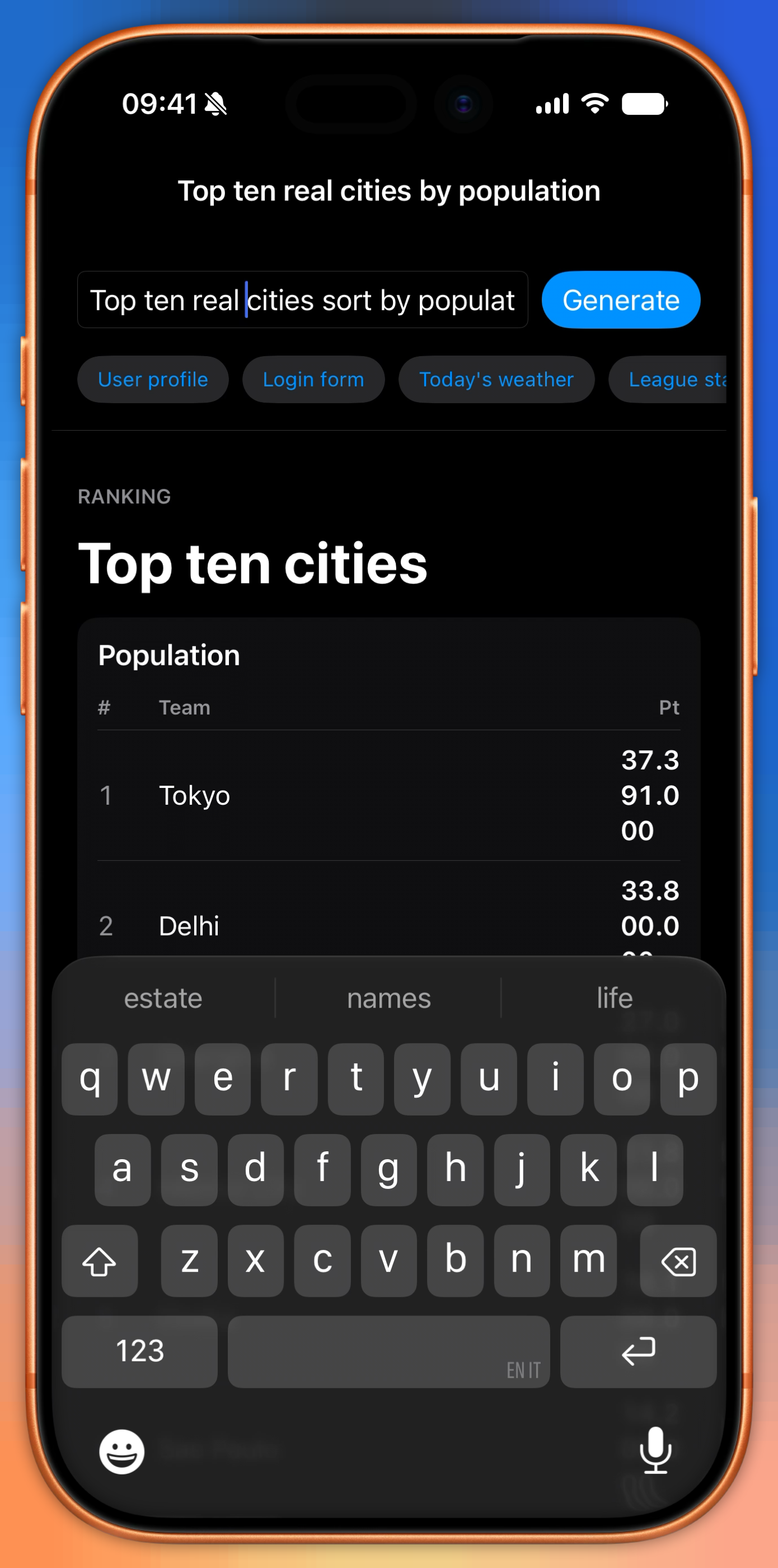
The first is the ceiling of the grammar. Ask for something your vocabulary cannot express, a chart, a map, a calendar, and the model approximates with what it has, usually a sad list of key-value rows. That is the thesis made visible. The model cannot compose what you did not give it. Good. That is the property that lets you reason about the output at all.
The second matters more. The on-device model is not a knowledge base. It is roughly 3 billion parameters, tuned for language, around 1.2 GB resident. Apple itself tells you not to lean on it for factual recall. Ask it for the actual Serie B table and it will hand you plausible teams with invented points, your club tenth when it is fighting for promotion. For a demo, fine. In production, the data has to come from a real source, and the model, at most, decides how to lay it out. The clean way to wire that up is a Tool: the model calls your code mid-generation to fetch the real standings, then arranges them. Facts from the tool, layout from the model. For something as data-pure as a plain table, the model adds almost nothing, and the right call might be to not involve it at all.
There is also a tension worth naming: the moment you turn temperature up, the same intent stops being reproducible, which complicates snapshot tests and review. The answer is that variety is opt-in, behind GenerationOptions. You add it where it earns its place and leave it off where it does not.
One last practical note, since latency is the first thing a reviewer will complain about. The first generation in a session is slow because the model has to warm up. If you know a request is coming, for example the user is on the screen with the input focused, call session.prewarm() ahead of time, or stream with streamResponse so the interface fills in property by property instead of appearing all at once.
So, is generative UI real now
Yes, with an asterisk I am comfortable with. You can ship an interface that an on-device model assembles at runtime, privately, with no network, no API cost, and a hard type guarantee on the output. The framework gained image input, dynamic profiles, and the option to route heavier composition to a server model this year, so the pattern has more room than it did. None of that removes the core discipline: you define the components, you write the renderer, you own the data. The model picks and arranges. It does not design, and it definitely does not know things.
Which, if you think about it, is the same deal you have with a junior who is fast, tireless, occasionally confidently wrong, and only useful inside a system someone sensible built. Abstract early, write less, cover more. The model is just another thing you abstract behind a protocol.
Comments